
-
 January 8, 2026
-
 12 min read mins read
 -
 0 Comments
How To Apply For Tax Registration Number (TRN) In UAE?
The Tax Registration Number (TRN) is a vital identification code assigned by the Federal Tax Authority (FTA) to all entities registered within the United Arab Emirates (UAE). This unique identifier is primarily acquired during the VAT registration process. However, it is also increasingly important for compliance with Corporate Tax regulations and for obtaining a Tax Residency Certificate.
A valid TRN is essential for ensuring your business adheres to tax regulations in the UAE. Without a valid TRN, your organization cannot fulfill its tax obligations, which can lead to serious legal issues. Conversely, possessing a valid TRN empowers VAT-registered companies to legally charge VAT, reclaim input VAT, submit tax returns, and demonstrate their status as taxable persons.
It’s crucial to understand that failing to register for VAT when required can result in significant penalties imposed by the FTA. Therefore, ensuring the validity of your TRN is a fundamental step in maintaining compliance with UAE tax laws and optimizing your business operations.
Summary
This guide explains what a UAE Tax Registration Number (TRN) is, who needs it (typically entities making taxable supplies with turnover above AED 375,000), and why it’s essential for VAT compliance. It covers the online FTA portal application process, required documents, and how to find and validate a TRN. You’ll also learn what to update after receiving your TRN, common mistakes to avoid, and practical tips to maintain compliance.
What is a TRN? Understanding the Tax Registration Number in UAE
The Tax Registration Number (TRN) is crucial for VAT compliance in the UAE. It acts as a unique identifier for entities registered under VAT.
In essence, the TRN helps the Federal Tax Authority (FTA) track tax liabilities. It enables businesses to legally charge VAT on supplies.
Key features of the TRN include:
- Unique to each registered business or individual
- Required for VAT transactions and returns
- Helps in proper VAT administration
With a TRN, businesses align with VAT regulations, fostering smooth financial operations. Knowing its importance makes VAT processes straightforward and efficient.
Who Needs a TRN in the UAE?

A TRN is mandatory for entities engaging in taxable activities in the UAE. Both businesses and individuals must register if they meet specific criteria.
Typically, entities with an annual turnover surpassing AED 375,000 are obligated to obtain a TRN. This ensures compliance with VAT regulations.
Here’s a quick list of those who need a TRN:
- Businesses exceeding the VAT threshold
- Individuals with substantial taxable supplies
- Entities involved in imports and exports
Having a TRN is pivotal for lawful and seamless business operations in the country.
Step-by-Step TRN Application Process via EmaraTax
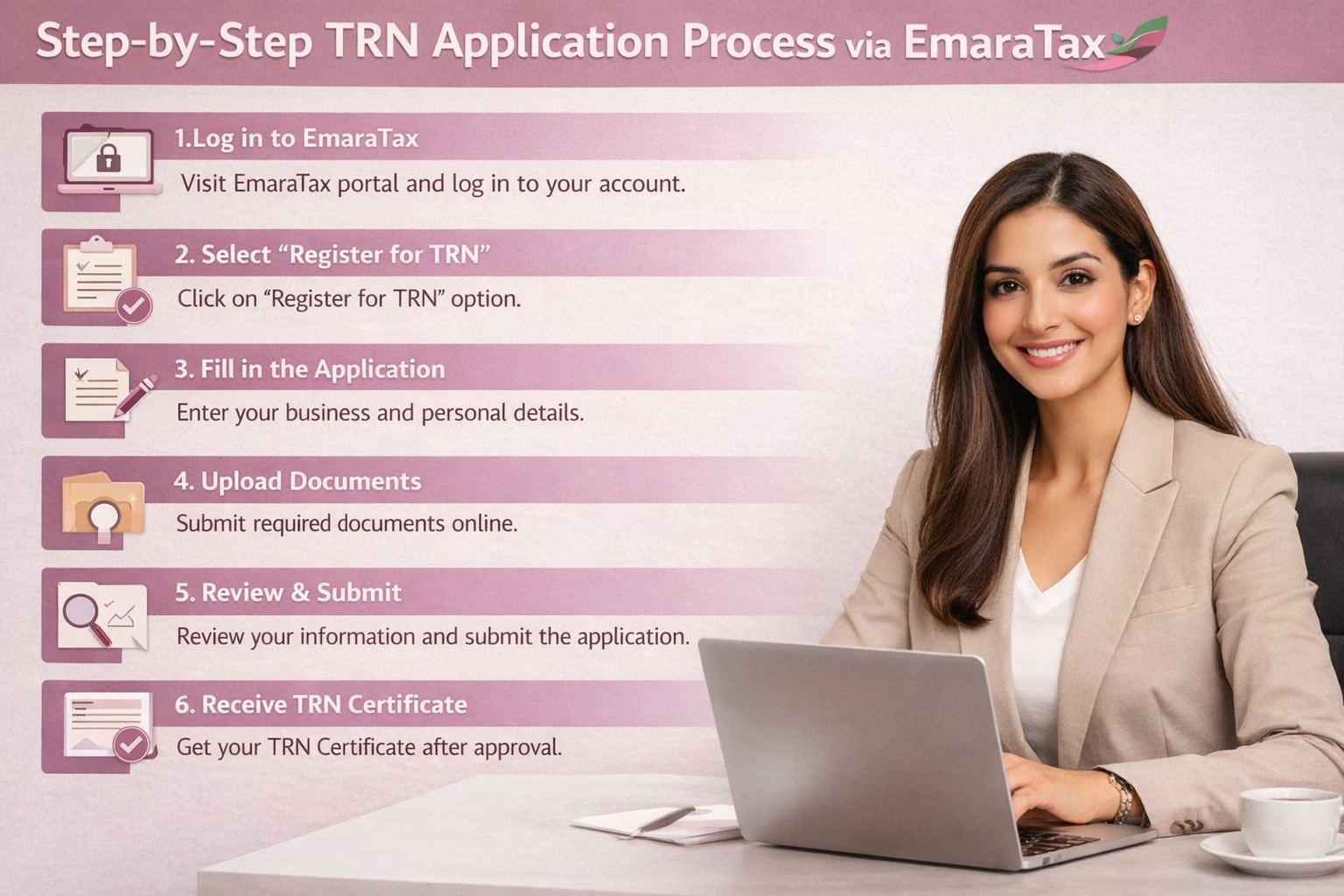
The complete application for a Tax Registration Number (TRN) for VAT purposes is finished online through the Federal Tax Authority’s official e-services portal, EmaraTax.
1. Create an EmaraTax Account
Go to the FTA Website and click “Sign Up,” or you may use your UAE Pass on your mobile device for quick registration. Enter your email address and mobile number, followed by a secure password. Lastly, check your email for the confirmation link sent to you and click that link to activate your account.
2. Log In and Create a Taxable Person Profile
Once logged in, you can see your Dashboard. Here, you have the option to create your Taxable Person Profile or manage your current Tax Profile. Click on the “Create Taxable Person” option. You will need to enter the following in your Taxable Person profile:
- Legal Entity Name (must match the name on your Trade License)
- Trade Name
- Contact Information and Physical Business Address (as per your Tenancy Contract/Ejari)
- Name and details of the Authorized Signatory (the authorized representative of your Company).
3. Initiate the VAT Registration Application
- Select Tax: From your profile dashboard, navigate to the “Value Added Tax” section.
- Start Application: Click on “Register” to begin the VAT application.
- Getting Started: Read the FTA’s “Getting Started Guide” and tick the confirmation box to proceed.
4. Fill Out the Detailed VAT Registration Form
The application is divided into several sections. Each section must be completed correctly to prevent delays with the TRN checking and approval process. The most important sections are:
- Applicant Details: The applicant’s information must align with the details contained in the Trade License (i.e., legal structure, licensing information, etc.).
- Business: This section contains information regarding the partners/owners of the business, the authorized signatory, and the banking details of the business. The banking details will be used for GIBAN generation and potential fund returns.
- Financials: Enter the total value of the business’s taxable supplies over the last year, and what the value is expected to be in the next month (30 days). This determines whether the business applies for mandatory or voluntary registration.
- Declaration: A declaration must be signed stating that the laws have been read and all information provided is correct and complete. Providing incorrect or false information can lead to severe penalties.
5. Upload Required Documents
The FTA requires specific supporting documents to confirm your application. Ensure all files are clear, valid, and match the data you have entered. The FTA typically accepts PDF and DOC formats, with a maximum file size of 15 MB per document.
Mandatory Documents (for Legal Persons/Companies):
- Valid Trade License (and any branch licenses)
- Memorandum of Association (MoA) or other incorporation documents
- Passport and Emirates ID copies of the owner/partners and the Authorized Signatory
- Proof of Bank Account (IBAN confirmation letter or a recent bank statement)
- Proof of Turnover (Audited financial statements, invoices, or a formal declaration letter confirming annual taxable supplies)
- Power of Attorney (if the applicant/signatory is not listed on the trade license)
6. Review and Submit
- Checking the Application: Ensure that the entire application has been thoroughly reviewed, including all uploaded documents. Errors or inconsistencies are common reasons for FTA requests for clarification, which can delay the application process.
- Submitting the Application: Once you have reviewed all information and are ready to submit, simply select “Submit.” An email confirmation will be sent to you, indicating that your application was received and is being reviewed, along with a confirmation in your EmaraTax account.
7. FTA Review and TRN Issuance
- Processing Time: The FTA will review your application and/or the submitted documents within 20 business days, provided that the application is fully completed. If the FTA requires additional information during the processing, the time may be extended.
- Notification of Approval: Once your application has been approved, the FTA will send you an email notification. You can then download your VAT Registration Certificate from your EmaraTax account, which will contain your 15-digit TRN.
By diligently following these steps, you can successfully apply for your Tax Registration Number (TRN) via EmaraTax, ensuring compliance with UAE tax regulations. If you have any further questions or need assistance, feel free to ask!
Eligibility Criteria for TRN Registration
Not all businesses are required to obtain a TRN in the UAE. The need to register hinges on annual turnover.
Specifically, businesses must register if:
- Annual turnover exceeds AED 375,000
- Involved in taxable supplies or imports
- Expected turnover surpasses the threshold
Understanding these criteria ensures compliance and avoids unnecessary registration. This streamlines tax processes for eligible businesses, maintaining harmony with UAE tax laws.
Documents Required for TRN Registration
When applying for a TRN, specific documents are required. These ensure your application is processed correctly by the Federal Tax Authority.
Essential documents include:
- Business trade license
- Passport copies of business owners
- Emirates ID copies
- Proof of business address
- Financial records outlining turnover
Having these documents ready simplifies the application process. Accurate documentation facilitates timely TRN approval, reducing potential administrative delays. Ensure all information is up-to-date and complete before submission.
How to Find Your VAT TRN Number and Check Its Validity
If you need to locate your VAT TRN number, there are straightforward methods available. Most of the time, the number is featured on tax invoices and your VAT certificate. Additionally, you can log in to the Federal Tax Authority portal, where your TRN is displayed.
To check the validity of a VAT registration number, use the FTA’s online validation tool. This ensures the number is active and correct. Follow these simple steps:
- Access the FTA website.
- Enter the VAT TRN number in the designated field.
- Verify the number’s status through the validation results.
The Essential Role of TRN in UAE Tax Compliance and Beyond

The Tax Registration Number (TRN) plays a crucial role in various tax and regulatory processes within the UAE.
A. TRN for VAT Compliance
To legally charge VAT and reclaim Input VAT, businesses must possess a valid TRN. This number should be included on:
- All tax invoices issued to customers
- All tax credit notes
- All VAT returns submitted through the EmaraTax portal
B. TRN Check and Verification
Conducting a TRN verification is a recommended practice for companies before engaging in taxable transactions with new suppliers. This step helps prevent fraudulent VAT collection and safeguards your eligibility to claim input tax credits.
To verify a TRN:
- Visit the official FTA website (tax.gov.ae).
- Locate the “TRN Verification” tool, usually found in the e-services section or as a quick link on the homepage.
- Input the 15-digit TRN and the security code (Captcha). The system will display the legal name of the entity associated with the TRN, confirming its validity. If there are discrepancies, it is imperative to contact the supplier and/or the FTA immediately.
C. TRN and the Tax Residency Certificate
The TRN is essential not only for VAT and corporate tax purposes but also for obtaining a Tax Residency Certificate (TRC). The TRC serves as official documentation from the Federal Tax Authority (FTA) affirming an individual or entity’s tax residency in the UAE for a specified period.
This certificate is significant for:
- Leveraging the UAE’s extensive network of Double Taxation Avoidance Agreements (DTAAs) with various countries.
- Minimizing or eliminating withholding tax on income generated outside the UAE.
To qualify for a TRC, businesses must maintain a valid TRN and demonstrate compliance with VAT and corporate tax obligations, thereby establishing their operational substance.
What to Do After Receiving Your TRN Certificate
After acquiring your TRN certificate, it’s important to keep it readily accessible. This document serves as proof of your VAT registration and compliance with regulations. Ensure that you familiarize yourself with its details.
You should also update your business documents to include the TRN. Important items to revise include:
- Sales invoices
- Purchase orders
- Business contracts
By doing so, you’ll ensure proper VAT accounting and adherence to UAE tax laws.
Common Mistakes to Avoid During TRN Registration
Many applicants make errors during TRN registration that lead to delays. Avoid these pitfalls by ensuring that all details you provide are complete and accurate.
Key mistakes include:
- Using incorrect financial figures
- Providing incomplete documents
- Missing application deadlines
Taking the time to double-check all inputs can prevent such mistakes. Proper preparation will ensure a smooth registration process.
Expert Support for a Smooth TRN Registration Process – Govvin Accounting
Applying for a Tax Registration Number (TRN) through the EmaraTax portal requires accuracy and regulatory knowledge. Even minor errors such as incorrect business details, turnover misstatements, or improperly uploaded documents can lead to delays or rejection by the Federal Tax Authority (FTA).
Govvin Accounting simplifies the TRN application process by ensuring your eligibility, preparing and verifying all required documents, submitting accurate applications, and coordinating directly with the FTA for timely approvals.
With Govvin Accounting’s expert support, you avoid compliance risks, late registration penalties, and unnecessary delays ensuring your business is VAT-ready and legally compliant in the UAE. By leveraging their expertise, you can focus on running your business while they handle the complexities of tax registration and compliance.
Frequently Asked Questions(FAQs)
Many people have queries about the TRN. Here are a few common ones. Do note that contacting the Federal Tax Authority (FTA) is also an option for specific queries.
1. What is a TRN used for?
The Tax Registration Number (TRN) is used primarily for tax-related purposes in the UAE. It is mandatory for businesses registered for VAT to include their TRN on all tax invoices, tax credit notes, and VAT returns. The TRN ensures that businesses can legally charge VAT, claim input VAT refunds, and comply with VAT regulations. It serves as proof of registration for tax purposes.
2. How can I check my TRN?
You can check your TRN’s validity through the official Federal Tax Authority (FTA) website. The FTA provides a TRN verification tool where you simply need to enter your 15-digit TRN and complete the security verification (Captcha). This will confirm whether your TRN is active and registered correctly.
3. Is the VAT number the same as a tax ID?
Yes, in the UAE, the VAT number and TRN are essentially the same. The TRN functions as the tax identification number for VAT purposes. Businesses must use this number for filing VAT returns, issuing invoices, and engaging with the FTA regarding tax-related matters.
4. Who needs to apply for a TRN?
Entities that need to apply for a TRN include businesses with taxable supplies exceeding the mandatory VAT threshold of AED 375,000 annually. Additionally, businesses with turnover exceeding AED 187,500 may opt for voluntary registration. Non-resident businesses that make taxable supplies in the UAE are also required to register and obtain a TRN, regardless of their turnover.
5. How long does it take to get a TRN?
The processing time for obtaining a TRN typically ranges from 5 to 20 business days after submitting the application. This timeframe depends on the accuracy and completeness of the submitted documents. If additional information is required by the FTA during the review, the processing time may be extended. Once approved, the TRN is issued along with a VAT Registration Certificate.
These questions are a starting point. For more detailed information, consider consulting official guidelines or expert advice.